- Export the project in WAR file by selecting the project to deploy -> Export -> WAR file

Export project as WAR - There are two ways to deploy WAR file in Apache Tomcat Server.First is through tomcat manager.The steps to deploy WAR from tomcat manager is described below:-
- Open tomcat-users.xml present at appBase location(default appBase is "$CATALINA_BASE)/config or from eclipse go to server >Tomcat v6.0 Server at localhost-config and add user with manager role.For Ex:- Add the following line<user username="admin" password="admin" roles="manager"/>
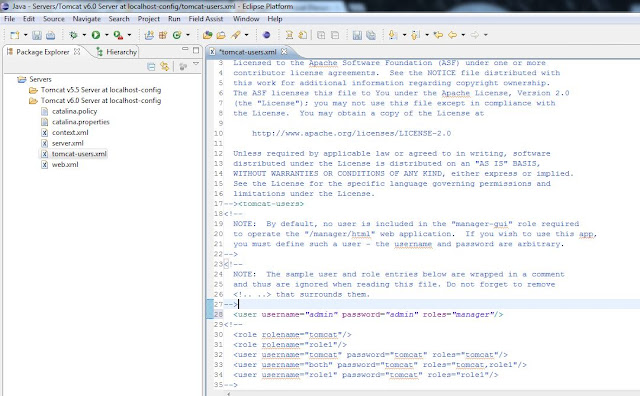
tomcat_users.xml - Start the tomcat server by executing startup.bat file present at bin folder of apache-tomcat.Open
the Apache Manager by clicking http://localhost:8080 and select Tomcat Manager.
Enter user name and password created using tomcat-users.xml.For our case it will be :-
Apache tomcat manager
Username = “admin”
Password=”admin" - Upload WAR file as shown below.
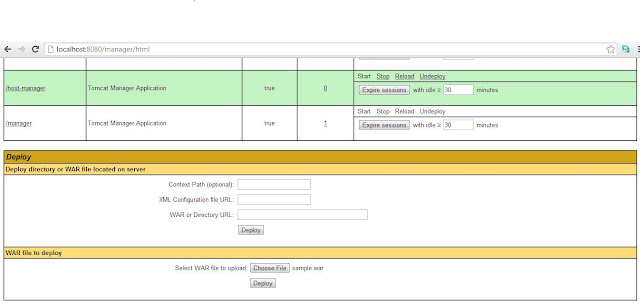
Add WAR file - Deployment on Tomcat startup
- The location you deploy web applications to for this type of deployment is called the
appBasewhich is specified per Host. Copy the WAR file to be deployed to appBase location.(default appBase is "$CATALINA_BASE/webapps").This method will work only if Host'sdeployOnStartupattribute is "true".
- The location you deploy web applications to for this type of deployment is called the
Wednesday, 24 October 2012
Deployment in Tomcat Apache Server


Saturday, 30 June 2012
Creating new Profile in WAS
Creating
and configuring Profile in WAS server with SCA Support
|
- First go to windows -> preferences
- Then Click on Server -> WebSphere Application Server
- Click on Run Profile Management Tool and select yes in the pop up box.You will get this window(If they above process doesn’t work,then go to C:\Program Files(x86)\IBM\SDP\runtimes\base_v7\bin\ProfileManagement and click on pmt.bat)
- Click on Launch Profile Management Tool. You will get the window shown below.
- Click on Create and Select Application Server and click on next.Again click on next.
- Uncheck the Enable Administrative Security(IF U DON'T WANT LOGIN USERNAME AND PASSWORD) and click on next.
- Click on create -> Finish and the new profile with AppSrv02 is created.
- Select the newly created profile and click on Augment
- Add one by one all augments (Application Server with Feature Pack SCA must be included otherwise it won’t support SCA)


If you have any other problem in configuring WAS,feel free to ask or mail me @ adiadidas9000[at]gmail.com
Sunday, 3 June 2012
DOS Tricks in JAVA
"tasklist" is a DOS command that displays the running processes in the Windows OS.It displays all the applications and services running with their PID(process ID).
Syntax
tasklist[.exe] [/s computer] [/u domain\user [/p password]] [/fo {TABLE|LIST|CSV}] [/nh] [/fi FilterName [/fi FilterName2 [ ... ]]] [/m [ModuleName] | /svc | /v]
| Parameters | Uses |
|---|---|
| /S system | Specifies the remote system to connect to. |
| /U [domain\]user | Specifies the user context under which the command should execute. |
| /P [password] | Specifies the password for the given user context. Prompts for input if omitted. |
| /M [module] | Lists all tasks currently using the given exe/dll name. If the module name is not specified all loaded modules are displayed. |
| /SVC | Displays services hosted in each process. |
| /V | Displays verbose task information. |
| /FI filter | Displays a set of tasks that match a given criteria specified by the filter. |
| /FO format | Specifies the output format. Valid values: "TABLE", "LIST", "CSV". |
| /NH | Specifies that the "Column Header" should not be displayed in the output. Valid only for "TABLE" and "CSV" formats. |
Filters
| Filter Name | Valid Operators | Valid values |
|---|---|---|
| STATUS | eq, ne | RUNNING | NOT RESPONDING | UNKNOWN |
| IMAGENAME | eq, ne | Image name |
| PID | eq, ne, gt, lt, ge, le | PID value |
| SESSION | eq, ne, gt, lt, ge, le | Session number |
| SESSIONNAME | eq, ne | Session name |
| CPUTIME | eq, ne, gt, lt, ge, le | CPU time in the format of hh:mm:ss.hh - hours,mm - minutesss - seconds |
| MEMUSAGE | eq, ne, gt, lt, ge, le | Memory usage in KB |
| USERNAME | eq, ne | User name in [domain\]user format |
| SERVICES | eq, ne | Service name |
| WINDOWTITLE | eq, ne | Window title |
MODULES | eq, ne | DLL name |
Now let us see how we can make utilization of this command with the help of some examples:-
- tasklist /s Computer
 |
| Process info of local/remote System |
- tasklist -v
- tasklist -fi
 |
| Filter Result of tasklist |
- tasklist -v -fi "ImageName eq VLC.exe" /fo csv
 |
| To get VLC Windows Title |
public String CallMe()
{
Runtime runtime = Runtime.getRuntime();
String cmds[] = {"cmd", "/c", "tasklist","/v","/fi","ImageName eq VLC.exe","/fo","CSV"};
Process proc;
String val = null;
try {
proc = runtime.exec(cmds);
InputStream inputstream = proc.getInputStream();
InputStreamReader inputstreamreader = new InputStreamReader(inputstream);
BufferedReader bufferedreader = new BufferedReader(inputstreamreader);
String line;
int count = 0;
while ((line = bufferedreader.readLine()) != null) {
if(count==1)
{
String[] a = line.split(",");
val = a[9];
}
count++;
}
} catch (IOException e) {
e.printStackTrace();
}
return val;
}
|
This can be used to set curent soundtrack as your GTalk status by using SMACK api to communicate with GOOGLE.
This will be explained in more depth in my next Blog.
Sunday, 15 April 2012
Three Sum Problem
A three sum problem is one in which sum of 3 numbers from a given inter array is zero.Find all pairs from the given array of n size along with the algorithm complexity.
A[i]+A[j]+A[k]=0
Approach
1) Sort the array
2) Loop i from 1 to n.
3)Initialize j to i and k to n-1
4)while k>j:do
- sum = a[i]+a[j]+a[k]
- if sum greater than zero increment j
- else decrement k
Complexity :-O(n2)
For Eg:-
In JAVA,
The source code for ThreeSum problem will be:-
For Eg:-
In JAVA,
The source code for ThreeSum problem will be:-
|
package com.collection.collection_ex; import java.util.ArrayList; import java.util.Arrays; import java.util.Collections; import java.util.HashSet; import java.util.Set; public class ThreeSum { static Set<ArrayList<Integer>> l=new HashSet<ArrayList<Integer>>(); public static void main(String args[]) { int[] array = {2,7,6,-7,0,8,-3,-5,-1,7,-7,14}; System.out.println(threeSum(array)); System.out.println(threeSum(array).size()); } public static Set<ArrayList<Integer>> threeSum(int[] array) { if(array == null) return null; int n = array.length; if(n < 3) return null; Arrays.sort(array); int count = 0; for(int i = 0; i < n - 1; i++) { int j = i ; int k = n - 1; while(k >j) { count++; int sum = array[i] + array[j] + array[k]; if(sum == 0) { ArrayList<Integer> s = new ArrayList<Integer>(); s.add(array[i]); s.add(array[j]); s.add(array[k]); Collections.sort(s); l.add(s); } if(sum < 0) j++; else k--; } } return l; } } |
Subscribe to:
Posts (Atom)